> ## Documentation Index
> Fetch the complete documentation index at: https://chatcli.edilsonfreitas.com/llms.txt
> Use this file to discover all available pages before exploring further.
# Web UI
> A browser app on the same engine as the terminal: chat, coder and agent with your tools, skills, memory, sessions and channels, streamed live, with the permission dialogs the loops raise answered from the page. Opened with /web next to the terminal or served with chatcli web.
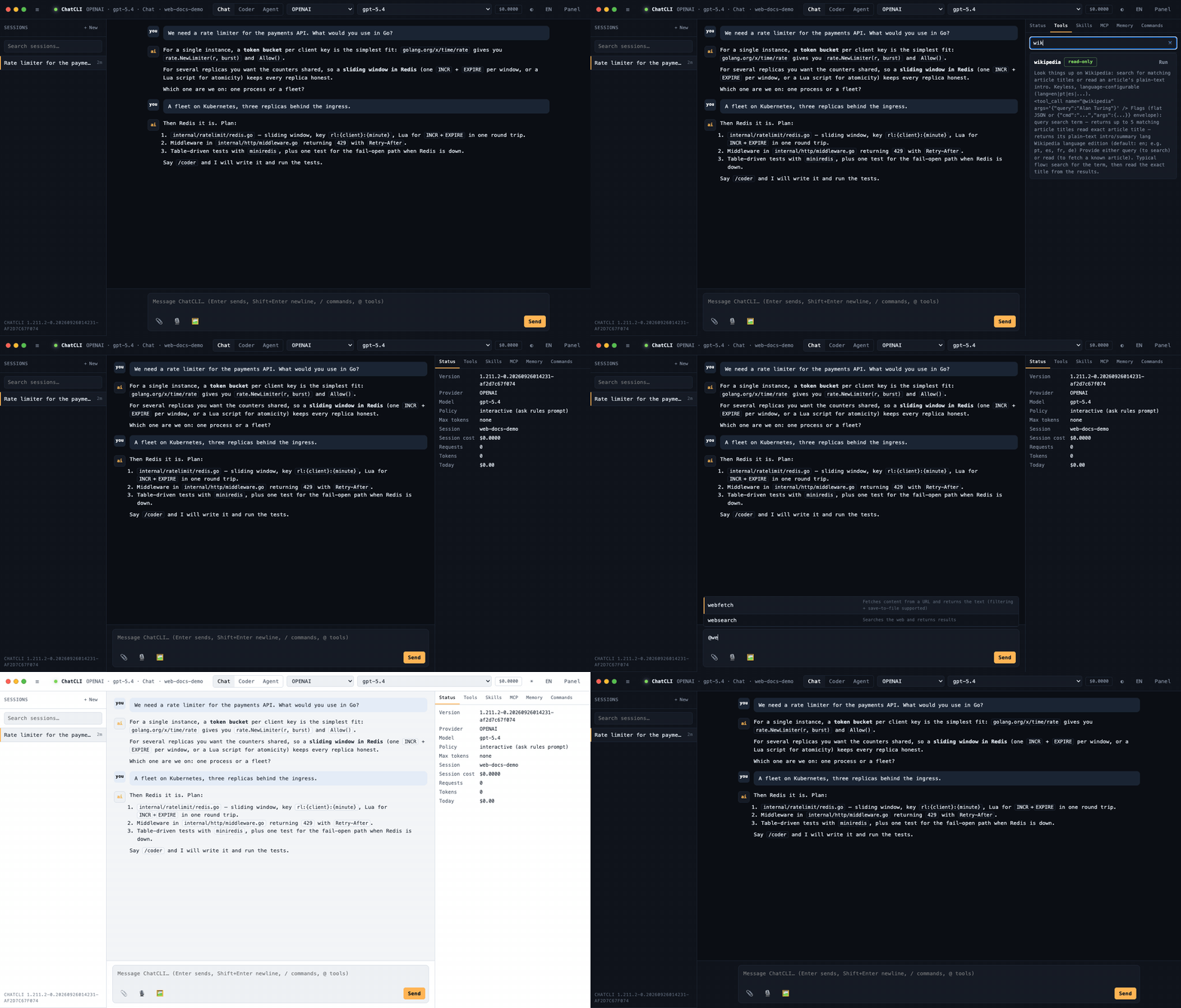
`/web` opens ChatCLI in your browser, next to the terminal, **on the same session**. What you type in the browser continues in the terminal, in MCP, in ACP and in your channels, and the other way round, because the browser drives the very same engine and the same saved sessions the other surfaces drive. `chatcli web` serves it without a terminal.
It is local by construction: the server binds the loopback interface on a free port, every run mints its own token, the token travels in a header the page reads from the address once, and nothing is sent anywhere but your own machine.
 ***
## Opening it
| Command | What it does |
| - | - |
| `/web` | Start the web UI bound to this terminal's session and open it in the browser |
| `/web url` | Start it and only print the address |
| `/web status` | Show whether it runs, its address, the child process and the bound session |
| `/web off` | Stop it |
| `chatcli web` | Serve the web UI from a terminal of its own, until `Ctrl+C`, bound to a fresh `web-` session |
| `chatcli web --session name` | Serve it bound to a saved session |
| `chatcli web --addr 127.0.0.1:8765 --no-browser` | Fixed port, print the address only |
`/web` works mid-run, like `/dash`. A terminal that is not bound to a saved session gets bound to a fresh one first (`web-`), so the conversation has a name both surfaces can follow; a bound terminal shares its session as is. The browser opens with exactly what that session holds: run `/web` mid-conversation and the page starts with those turns and syncs from there; run it on a terminal that has not typed yet and the page starts empty. It never refills from the rolling `mcp-web` mirror of a previous run. Closing the terminal stops the web UI: the address carried a token only that process handed out.
`chatcli web` on its own does the same: without `--session` it binds the browser to a fresh `web-` session, created on the first completed turn, so each standalone run keeps its own conversation instead of overwriting the rolling `mcp-web` mirror. Nothing is saved "at the end": every completed turn is written through as it finishes, so `Ctrl+C` or closing the tab loses at most a turn that was still streaming. A terminal bound to a named session, including the `web-` one `/web` creates, is flushed once more on exit and is **not** duplicated as an `autosave-` file.
The browser only opens from an interactive terminal. `chatcli web --no-browser`, or a pipe, prints the address instead.
## Continuity across surfaces
The web UI is not a second engine. It runs on the shared RPC backend that the [MCP server](/server/mcp-server), the [ACP server](/server/acp) and the [chat gateway](/gateway/chat-gateway) run on, and it keeps a session the way they do:
* the browser's live history is **bound** to a saved session and written through after every turn;
* before each turn the bound session is re-read when another surface changed it (the terminal, an IDE over ACP, a WhatsApp or Telegram conversation through the gateway), so a reply given elsewhere is in the transcript before you continue;
* the [Conversation Hub](/gateway/conversation-hub) thread of the principal is resumed, exactly as `chatcli mcp-server` does.
The sidebar lists every saved session with its title. Attach one to continue it, fork it, or start a fresh one. **+ New** clears the page and binds it to a fresh `web-` session of its own (the file appears on the first turn), so the new conversation is saved and listed like any other; the terminal keeps the session it had, and the header names the session the page is bound to. Deleting is the same `/session delete` the terminal runs.
## What you see
| Area | What it holds |
| - | - |
| **Header** | Mode (Chat, Coder, Agent), provider and model selectors filled from the catalog and the live model lists, the session cost, theme and language toggles, the panel toggle |
| **Sessions** | Saved sessions with titles and age, search, new, fork, delete |
| **Transcript** | Streamed replies rendered as Markdown (headings, lists, tables, fenced code with copy), thinking blocks, tool cards with input and output, the agent's plan, cancel and error notices |
| **Composer** | Enter sends, Shift+Enter breaks the line, `/` opens the command palette, `@` the tool palette; images by file picker or paste; microphone, Talk and image generation buttons |
| **Panel** | Status (route, policy, max tokens, cost, daily budget), Tools, Skills with a filter and a pin switch per skill, MCP servers with an on/off switch each, Memory resources, Commands |
### Switching MCP servers and skills
**Panel → MCP** has a switch per configured server. Turning it on or off does exactly what `/mcp start ` and `/mcp stop ` do: the server shows *starting…* while it connects, and the tool list refreshes when it is up. **Panel → Skills** has a pin switch per skill, the same as `/skill pin ` and `/skill unpin `: a pinned skill joins every turn of the session, and pinned skills are listed first with a count. Skills marked manual-only (`disable-model-invocation`) cannot be pinned; their switch is disabled and they still run when you call them as `/`.
Like their terminal commands, the switches last while the web process runs: MCP servers come back as configured on the next start, and pins belong to the session. `/web` serves the page from its own `chatcli web` process, so a switch changes the servers and pins of the browser's turns, not the terminal's.
### Modes and permissions
Chat turns stream token by token through the provider's streaming path. Coder and agent turns stream the loop's structured events: thoughts, messages, every tool call as it starts and ends, and the plan. When a loop reaches a policy-gated action (an `ask` rule, a dangerous command), the page shows the same permission dialog the IDE gets over ACP: **allow once**, **allow always**, **deny**, **deny always**. No answer within the timeout (`CHATCLI_MCP_PERMISSION_TIMEOUT`, default 10 minutes) denies the action once, so a walked-away browser never leaves a loop hanging.
One turn at a time, as in the terminal: while a turn runs, sending another is refused with a clear notice instead of queueing silently. Closing the tab cancels the run.
### Provider and model
The selectors show what the engine can reach: providers with credentials, and per provider the models the catalog knows plus what the provider's API lists live. Picking one sets the route for the turns that follow, without touching the terminal's own selection. Skills that pin a model still win for the turns they fire on.
### Slash commands and tools in the composer
A line that starts with `/` or `@` is routed the way the terminal routes it, before it reaches the model. Commands work typed in the composer, picked from the `/` autocomplete, or run from **Panel → Commands**. After a command and a space the autocomplete offers its subcommands, flags and values from the terminal's own completer, so `/mcp ` lists `status`, `start`, `stop` and the rest with their descriptions, and `/skill pin ` lists skills. Arrows move, Tab or Enter accepts, Esc closes:
* `/chat`, `/agent`, `/run` and `/coder` switch the page's mode; `/coder fix the test` switches and runs the rest of the line in that mode.
* Everything the [ACP surface](/server/acp) runs headless runs here too, listed by `GET /api/commands`: `/help`, `/session`, `/memory`, `/model`, `/switch`, `/cost`, `/policy`, `/config`, `/storage`, `/mcp`, `/skill`, `/dash` and the others. They answer in the transcript. `/session load`, `attach`, `detach` and `fork` also re-render the page with the session they leave it bound to.
* [Custom command templates](/extensions/slash-commands) (`~/.chatcli/commands`, the project's `.chatcli/commands`, `.claude/commands`, `~/.codex/prompts` and the other sources) and user-invocable [skills](/extensions/skill-authoring) (`/ args`) run as a turn in the page's current mode, the way ACP runs them.
* In chat mode a leading `@tool` runs that tool directly, as `chatcli tool` does, and shows its output as a tool block; `@file`, `@git`, `@env` and `@history` stay context injectors for the model.
* Any other `/text` that is not a known command goes to the model as user text, so a path or a typo is never hijacked.
The page also serves the commands that act on the conversation itself, with browser semantics:
| Command | What it does in the page |
| - | - |
| `/clear` (also `/newsession`, `/session new`) | The same as **+ New**: a fresh conversation bound to a new `web-` session. The previous conversation stays saved in **Sessions**. |
| `/retry` | Asks the last turn again exactly as it was recorded (text, images, mode and route) and replaces its reply. If the retry fails, the previous reply is restored. This is not the terminal's `/retry`, which re-sends a chunk of the large-file flow. |
| `/rewind [n]` | Drops the last `n` turns (default 1) from the conversation and from the bound saved session; a terminal sharing that session adopts the shorter conversation on its next turn. Only the conversation rewinds: files a coder turn changed stay as they are. `/rewind compact` (undoing a compaction) is terminal-only. |
| `/plan` | Arms plan-first as the terminal does and shows the session's last plan in the plan panel. `/plan ` or `/plan agent ` runs the task plan-first in agent mode, `/plan coder ` in coder mode, and `/plan preview ` shows the plan without running it. |
| `/jobs` | Read-only: `list` (the default), `show`, `tree`, `logs`, `history` and `help`. Cancelling, pausing, pruning and the other changes run in the terminal. |
| `/schedule` | `/schedule list` is `/jobs list`. `/schedule ` creates the job. Unless the [scheduler daemon](/tools/scheduler) runs (`chatcli daemon start`), the job runs in the web process's scheduler and stops with it. |
| `/hooks` | Lists the configured [hooks](/extensions/hooks-system). |
| `/lsp ` | Shows the [LSP diagnostics](/coder/lsp-diagnostics) for the file. |
`/wait` is not available, because it holds the conversation until a condition is met and the page runs one turn at a time: schedule the wait with `/schedule --wait ` and follow it with `/jobs`. The terminal's large-file commands `/retryall`, `/nextchunk` and `/skipchunk` are refused and point to `/retry`.
Commands that only make sense in a terminal answer with the reason and what to do instead:
| Command | Why it stays in the terminal |
| - | - |
| `/exit`, `/quit` | Close the tab, or stop `chatcli web` (Ctrl+C where it runs, or `/web stop` in the terminal that opened it). |
| `/menu` | Opens the terminal's menu; in the page, type `/` or open **Panel → Commands**. |
| `/update` | Replaces the running binary; restart the web UI afterwards. |
| `/auth` | Runs an interactive login; log in in the terminal, then restart the web UI. |
| `/gateway`, `/watch`, `/connect` | Start or drive a long-running process tied to the terminal. |
| `/worktree` | Switches the terminal session's working tree. |
| `/reload` | Reloads the terminal's configuration; restart the web UI (`/web stop`, then `/web`) to pick up changes. |
| `/reset`, `/redraw` | Redraw the terminal screen (in the REPL, `/reset` redraws the terminal); in the page, use `/clear` to start a new conversation. |
Any other known REPL command outside these lists answers that it is not available in the web app.
### Images
Attach images with the file picker or paste them into the composer. A caption is optional: an image sent on its own asks the model to analyze it and describe what it shows.
* Attached images travel with the turn and **stay in the conversation** for the turns that follow. A private copy of each is also saved under `~/.chatcli/attachments/` (directory `0700`, files `0600`, sealed at rest when `CHATCLI_ENCRYPTION_KEY` is set), and the turn names the saved path, so a coder or agent run can look at it again with `@view ` and the reference survives compaction and the terminal continuing the session. The copies expire with the session TTL (`CHATCLI_SESSION_TTL`, 90 days); `/storage` lists and prunes them as the `attachments` store, and `/config retention` shows the policy.
* A line sent with attachments **always goes to the model**, even when it starts with an `@tool`. In chat, `@view shot.png what is wrong?` attaches that local image the way `@file` does; `@view` never runs on its own in chat, because there the turn itself carries the image.
* Vision is judged against the model the page routes the turn to: a vision model receives the image itself; a model without vision gets the describe fallback (the image is described by a vision model first).
* Limits: up to **32 MB per request**; a larger one is refused with a clear `413` naming the limit instead of a decoder error. Saved copies are capped at 20 MB per image.
### Voice
Voice input works out of the box. The page prefers the **embedded offline engines** — Whisper for speech in, Kokoro for speech out, no API key and no account — for every direction that `CHATCLI_TRANSCRIPTION_*` and `CHATCLI_TTS_*` leave unconfigured; a cloud API key alone is not a choice of speech engine (it is there for the chat models). `CHATCLI_TRANSCRIPTION_PROVIDER`, `_CMD` or `_URL`, and their `CHATCLI_TTS_*` counterparts, pin another engine and win.
* The first click on the microphone or the speak button **asks before downloading** the embedded engine (about 233 MB for Whisper base, about 158 MB for Kokoro; less when parts are already cached), with a progress bar and a cancel button, or lets you keep the engine that serves now (`Use for now`) or postpone. The download runs in the background, survives closing the dialog, and the engine takes over as soon as it is ready.
* Recordings are converted **in the browser** to 16 kHz mono WAV, so no ffmpeg is needed on the machine; a browser that cannot decode its own recording sends it as recorded and the server says why when it cannot decode it.
* The microphone shows its state — recording, transcribing — and errors with their reason (permission denied, no speech detected, unsupported browser). Click to talk, click again to stop; **Esc discards** a recording, or stops a reply being read.
* **Talk** starts a voice conversation: what you say is transcribed and sent on its own, the reply is spoken back without code or Markdown symbols, and the page listens again once the reply ends. A pause of about 1.3 s ends your turn; a listen that hears nothing ends the loop quietly; starting to record while a reply is being read stops it.
* The **speak button** on every reply uses the same engine choice. The macOS `say` fallback is converted to WAV on the way out, so it plays in every browser.
* The status panel shows the engine serving each direction (`Voice in`, `Voice out`) and offers the download when the offline engine is not installed yet; `/config web` prints the same rows in the terminal.
Only the web page prefers the embedded engines and asks before downloading them. The [gateway](/gateway/chat-gateway) and `@speak` keep the process defaults: local and keyless engines first, the embedded engine from cache or as the last resort.
### Image generation
With an image provider configured (`CHATCLI_IMAGE_*`), the image button turns the composer text into an image. Features that are not configured are hidden, not broken.
## The API behind the page
The page talks to a small JSON API on the same origin. It is documented here because a script can drive it as well as the page does, with the token from the address:
| Endpoint | Purpose |
| - | - |
| `GET /api/boot` | Everything the page needs at load: language, theme, features, providers, tools, skills, commands, resources, sessions, status and the live history |
| `POST /api/turn` | Run a turn; the response is a stream of server-sent events (`run`, `chunk`, `thought`, `message`, `tool_start`, `tool_end`, `plan`, `permission`, `done`, `error`) |
| `POST /api/runs/{id}/permission` | Answer a permission dialog: `allow_once`, `allow_always`, `deny_once`, `deny_always` |
| `POST /api/runs/{id}/cancel` | Cancel the running turn |
| `GET /api/sessions`, `GET /api/sessions/{name}/messages`, `POST /api/session` | The session catalog, a saved session's messages, and the attach/save/fork/clear actions |
| `GET /api/tools`, `POST /api/tools/{name}` | The tool catalog and a direct tool call |
| `GET /api/skills`, `GET /api/skills/{name}`, `GET /api/commands`, `POST /api/command` | Skills (with `pinned` and `manual_only`), their content, the slash commands the surface may run, and running one |
| `POST /api/mcp/{name}`, `POST /api/skills/{name}` | Start or stop an MCP server (`{"on": true}`), pin or unpin a skill (`{"pinned": true}`); `501 unsupported` from a backend without the switches |
| `GET /api/complete?line=` | Completions for the last word of a slash command line: `{"items": [{"text", "description"}]}` |
| `GET /api/resources`, `GET /api/resource?uri=` | Memory and context resources (`chatcli://memory/...`) |
| `GET /api/status`, `POST /api/defaults` | Route, cost, budget and MCP status; changing the default provider and model |
| `POST /api/tts`, `POST /api/stt`, `POST /api/image` | Speak a text (`{text}`; Markdown and code are stripped first, AIFF is converted to WAV), transcribe an audio body (any container the engine decodes; the page sends 16 kHz mono WAV, `?lang=` hints the language), generate an image. `409 voice_install` means the offline engine is on offer and not installed yet |
| `GET /api/voice/status`, `POST /api/voice/install`, `POST /api/voice/cancel` | The engine serving each direction (`stt`, `tts`), whether the embedded install is on offer and its download size, and the running install's progress; start the install (`{targets: ["stt","tts"]}`) or cancel it |
Every call carries `X-Web-Token: `; the token is never accepted from the query, the Host must match the bound address exactly (a DNS-rebinding guard), and the page ships with a strict Content-Security-Policy that allows no external resource.
## Privacy and safety
* Loopback only. A request to bind another interface is refused.
* One token per run, 128 bits, in memory. Stop the process and the address is dead.
* The web UI runs the engine **unattended** like MCP and ACP: dangerous commands follow `CHATCLI_MCP_DANGER` (`block` turns them into in-band refusals) and the permission dialog covers the `ask` rules. `/policy` in the terminal changes the rules for both.
* The page is one embedded file. No CDN, no fonts, no analytics, works offline.
## Configuration
| Setting | Default | Meaning |
| - | - | - |
| `chatcli web --addr` | `127.0.0.1:0` | Listen address; loopback addresses only |
| `chatcli web --session` | none | Saved session to bind at start |
| `chatcli web --no-browser` | off | Print the address instead of opening the browser |
| `CHATCLI_MCP_PERMISSION_TIMEOUT` | `600s` | How long a permission dialog waits before denying once |
| `CHATCLI_MCP_DANGER` | ask | `block` refuses dangerous commands in-band |
| `CHATCLI_MCP_HUB` | on | `off` skips the Conversation Hub resume |
| `CHATCLI_TRANSCRIPTION_PROVIDER` / `_CMD` / `_URL`, `CHATCLI_TRANSCRIPTION_MODEL`, `CHATCLI_TRANSCRIPTION_LANG` | unset | Pin a speech-to-text engine (unset: the page prefers embedded Whisper); the Whisper model size (`base`); the default language hint |
| `CHATCLI_TTS_PROVIDER` / `_CMD` / `_URL`, `CHATCLI_TTS_VOICE`, `CHATCLI_TTS_VOICE_PT` | unset | Pin a text-to-speech engine (unset: the page prefers embedded Kokoro); the voices |
| `CHATCLI_SESSION_TTL` | `90` | Days the saved image attachments are kept |
`/config web` shows whether the web UI runs, its address, the child process, the bound session and the log file (`~/.chatcli/web.log`), plus the voice rows: the engine the page uses for each direction and the state of the offline engine it prefers (installed, or its download size).
## Relationship to the other surfaces
| Surface | Talks to | Session continuity | Streams | Permissions |
| - | - | - | - | - |
| Terminal | the engine directly | its bound session | yes | inline prompts |
| Web UI | shared RPC backend | bound session + hub | SSE | browser dialog |
| MCP server | shared RPC backend | bound session + hub | line emit | elicitation |
| ACP | shared RPC backend | bound session + hub | structured events | `session/request_permission` |
| Gateway | its own ChatCLI, unattended | hub | reply per message | auto |
What every process is doing, as a live graph. Open it from the web UI's terminal with `/dash`: the web UI shows up as its own `web` window, with its turns, model calls, tools and skills.
How a saved session follows you across the terminal, IDEs and channels.
This documentation is built and hosted on [Mintlify](https://mintlify.com), a developer documentation platform.
***
## Opening it
| Command | What it does |
| - | - |
| `/web` | Start the web UI bound to this terminal's session and open it in the browser |
| `/web url` | Start it and only print the address |
| `/web status` | Show whether it runs, its address, the child process and the bound session |
| `/web off` | Stop it |
| `chatcli web` | Serve the web UI from a terminal of its own, until `Ctrl+C`, bound to a fresh `web-` session |
| `chatcli web --session name` | Serve it bound to a saved session |
| `chatcli web --addr 127.0.0.1:8765 --no-browser` | Fixed port, print the address only |
`/web` works mid-run, like `/dash`. A terminal that is not bound to a saved session gets bound to a fresh one first (`web-`), so the conversation has a name both surfaces can follow; a bound terminal shares its session as is. The browser opens with exactly what that session holds: run `/web` mid-conversation and the page starts with those turns and syncs from there; run it on a terminal that has not typed yet and the page starts empty. It never refills from the rolling `mcp-web` mirror of a previous run. Closing the terminal stops the web UI: the address carried a token only that process handed out.
`chatcli web` on its own does the same: without `--session` it binds the browser to a fresh `web-` session, created on the first completed turn, so each standalone run keeps its own conversation instead of overwriting the rolling `mcp-web` mirror. Nothing is saved "at the end": every completed turn is written through as it finishes, so `Ctrl+C` or closing the tab loses at most a turn that was still streaming. A terminal bound to a named session, including the `web-` one `/web` creates, is flushed once more on exit and is **not** duplicated as an `autosave-` file.
The browser only opens from an interactive terminal. `chatcli web --no-browser`, or a pipe, prints the address instead.
## Continuity across surfaces
The web UI is not a second engine. It runs on the shared RPC backend that the [MCP server](/server/mcp-server), the [ACP server](/server/acp) and the [chat gateway](/gateway/chat-gateway) run on, and it keeps a session the way they do:
* the browser's live history is **bound** to a saved session and written through after every turn;
* before each turn the bound session is re-read when another surface changed it (the terminal, an IDE over ACP, a WhatsApp or Telegram conversation through the gateway), so a reply given elsewhere is in the transcript before you continue;
* the [Conversation Hub](/gateway/conversation-hub) thread of the principal is resumed, exactly as `chatcli mcp-server` does.
The sidebar lists every saved session with its title. Attach one to continue it, fork it, or start a fresh one. **+ New** clears the page and binds it to a fresh `web-` session of its own (the file appears on the first turn), so the new conversation is saved and listed like any other; the terminal keeps the session it had, and the header names the session the page is bound to. Deleting is the same `/session delete` the terminal runs.
## What you see
| Area | What it holds |
| - | - |
| **Header** | Mode (Chat, Coder, Agent), provider and model selectors filled from the catalog and the live model lists, the session cost, theme and language toggles, the panel toggle |
| **Sessions** | Saved sessions with titles and age, search, new, fork, delete |
| **Transcript** | Streamed replies rendered as Markdown (headings, lists, tables, fenced code with copy), thinking blocks, tool cards with input and output, the agent's plan, cancel and error notices |
| **Composer** | Enter sends, Shift+Enter breaks the line, `/` opens the command palette, `@` the tool palette; images by file picker or paste; microphone, Talk and image generation buttons |
| **Panel** | Status (route, policy, max tokens, cost, daily budget), Tools, Skills with a filter and a pin switch per skill, MCP servers with an on/off switch each, Memory resources, Commands |
### Switching MCP servers and skills
**Panel → MCP** has a switch per configured server. Turning it on or off does exactly what `/mcp start ` and `/mcp stop ` do: the server shows *starting…* while it connects, and the tool list refreshes when it is up. **Panel → Skills** has a pin switch per skill, the same as `/skill pin ` and `/skill unpin `: a pinned skill joins every turn of the session, and pinned skills are listed first with a count. Skills marked manual-only (`disable-model-invocation`) cannot be pinned; their switch is disabled and they still run when you call them as `/`.
Like their terminal commands, the switches last while the web process runs: MCP servers come back as configured on the next start, and pins belong to the session. `/web` serves the page from its own `chatcli web` process, so a switch changes the servers and pins of the browser's turns, not the terminal's.
### Modes and permissions
Chat turns stream token by token through the provider's streaming path. Coder and agent turns stream the loop's structured events: thoughts, messages, every tool call as it starts and ends, and the plan. When a loop reaches a policy-gated action (an `ask` rule, a dangerous command), the page shows the same permission dialog the IDE gets over ACP: **allow once**, **allow always**, **deny**, **deny always**. No answer within the timeout (`CHATCLI_MCP_PERMISSION_TIMEOUT`, default 10 minutes) denies the action once, so a walked-away browser never leaves a loop hanging.
One turn at a time, as in the terminal: while a turn runs, sending another is refused with a clear notice instead of queueing silently. Closing the tab cancels the run.
### Provider and model
The selectors show what the engine can reach: providers with credentials, and per provider the models the catalog knows plus what the provider's API lists live. Picking one sets the route for the turns that follow, without touching the terminal's own selection. Skills that pin a model still win for the turns they fire on.
### Slash commands and tools in the composer
A line that starts with `/` or `@` is routed the way the terminal routes it, before it reaches the model. Commands work typed in the composer, picked from the `/` autocomplete, or run from **Panel → Commands**. After a command and a space the autocomplete offers its subcommands, flags and values from the terminal's own completer, so `/mcp ` lists `status`, `start`, `stop` and the rest with their descriptions, and `/skill pin ` lists skills. Arrows move, Tab or Enter accepts, Esc closes:
* `/chat`, `/agent`, `/run` and `/coder` switch the page's mode; `/coder fix the test` switches and runs the rest of the line in that mode.
* Everything the [ACP surface](/server/acp) runs headless runs here too, listed by `GET /api/commands`: `/help`, `/session`, `/memory`, `/model`, `/switch`, `/cost`, `/policy`, `/config`, `/storage`, `/mcp`, `/skill`, `/dash` and the others. They answer in the transcript. `/session load`, `attach`, `detach` and `fork` also re-render the page with the session they leave it bound to.
* [Custom command templates](/extensions/slash-commands) (`~/.chatcli/commands`, the project's `.chatcli/commands`, `.claude/commands`, `~/.codex/prompts` and the other sources) and user-invocable [skills](/extensions/skill-authoring) (`/ args`) run as a turn in the page's current mode, the way ACP runs them.
* In chat mode a leading `@tool` runs that tool directly, as `chatcli tool` does, and shows its output as a tool block; `@file`, `@git`, `@env` and `@history` stay context injectors for the model.
* Any other `/text` that is not a known command goes to the model as user text, so a path or a typo is never hijacked.
The page also serves the commands that act on the conversation itself, with browser semantics:
| Command | What it does in the page |
| - | - |
| `/clear` (also `/newsession`, `/session new`) | The same as **+ New**: a fresh conversation bound to a new `web-` session. The previous conversation stays saved in **Sessions**. |
| `/retry` | Asks the last turn again exactly as it was recorded (text, images, mode and route) and replaces its reply. If the retry fails, the previous reply is restored. This is not the terminal's `/retry`, which re-sends a chunk of the large-file flow. |
| `/rewind [n]` | Drops the last `n` turns (default 1) from the conversation and from the bound saved session; a terminal sharing that session adopts the shorter conversation on its next turn. Only the conversation rewinds: files a coder turn changed stay as they are. `/rewind compact` (undoing a compaction) is terminal-only. |
| `/plan` | Arms plan-first as the terminal does and shows the session's last plan in the plan panel. `/plan ` or `/plan agent ` runs the task plan-first in agent mode, `/plan coder ` in coder mode, and `/plan preview ` shows the plan without running it. |
| `/jobs` | Read-only: `list` (the default), `show`, `tree`, `logs`, `history` and `help`. Cancelling, pausing, pruning and the other changes run in the terminal. |
| `/schedule` | `/schedule list` is `/jobs list`. `/schedule ` creates the job. Unless the [scheduler daemon](/tools/scheduler) runs (`chatcli daemon start`), the job runs in the web process's scheduler and stops with it. |
| `/hooks` | Lists the configured [hooks](/extensions/hooks-system). |
| `/lsp ` | Shows the [LSP diagnostics](/coder/lsp-diagnostics) for the file. |
`/wait` is not available, because it holds the conversation until a condition is met and the page runs one turn at a time: schedule the wait with `/schedule --wait ` and follow it with `/jobs`. The terminal's large-file commands `/retryall`, `/nextchunk` and `/skipchunk` are refused and point to `/retry`.
Commands that only make sense in a terminal answer with the reason and what to do instead:
| Command | Why it stays in the terminal |
| - | - |
| `/exit`, `/quit` | Close the tab, or stop `chatcli web` (Ctrl+C where it runs, or `/web stop` in the terminal that opened it). |
| `/menu` | Opens the terminal's menu; in the page, type `/` or open **Panel → Commands**. |
| `/update` | Replaces the running binary; restart the web UI afterwards. |
| `/auth` | Runs an interactive login; log in in the terminal, then restart the web UI. |
| `/gateway`, `/watch`, `/connect` | Start or drive a long-running process tied to the terminal. |
| `/worktree` | Switches the terminal session's working tree. |
| `/reload` | Reloads the terminal's configuration; restart the web UI (`/web stop`, then `/web`) to pick up changes. |
| `/reset`, `/redraw` | Redraw the terminal screen (in the REPL, `/reset` redraws the terminal); in the page, use `/clear` to start a new conversation. |
Any other known REPL command outside these lists answers that it is not available in the web app.
### Images
Attach images with the file picker or paste them into the composer. A caption is optional: an image sent on its own asks the model to analyze it and describe what it shows.
* Attached images travel with the turn and **stay in the conversation** for the turns that follow. A private copy of each is also saved under `~/.chatcli/attachments/` (directory `0700`, files `0600`, sealed at rest when `CHATCLI_ENCRYPTION_KEY` is set), and the turn names the saved path, so a coder or agent run can look at it again with `@view ` and the reference survives compaction and the terminal continuing the session. The copies expire with the session TTL (`CHATCLI_SESSION_TTL`, 90 days); `/storage` lists and prunes them as the `attachments` store, and `/config retention` shows the policy.
* A line sent with attachments **always goes to the model**, even when it starts with an `@tool`. In chat, `@view shot.png what is wrong?` attaches that local image the way `@file` does; `@view` never runs on its own in chat, because there the turn itself carries the image.
* Vision is judged against the model the page routes the turn to: a vision model receives the image itself; a model without vision gets the describe fallback (the image is described by a vision model first).
* Limits: up to **32 MB per request**; a larger one is refused with a clear `413` naming the limit instead of a decoder error. Saved copies are capped at 20 MB per image.
### Voice
Voice input works out of the box. The page prefers the **embedded offline engines** — Whisper for speech in, Kokoro for speech out, no API key and no account — for every direction that `CHATCLI_TRANSCRIPTION_*` and `CHATCLI_TTS_*` leave unconfigured; a cloud API key alone is not a choice of speech engine (it is there for the chat models). `CHATCLI_TRANSCRIPTION_PROVIDER`, `_CMD` or `_URL`, and their `CHATCLI_TTS_*` counterparts, pin another engine and win.
* The first click on the microphone or the speak button **asks before downloading** the embedded engine (about 233 MB for Whisper base, about 158 MB for Kokoro; less when parts are already cached), with a progress bar and a cancel button, or lets you keep the engine that serves now (`Use for now`) or postpone. The download runs in the background, survives closing the dialog, and the engine takes over as soon as it is ready.
* Recordings are converted **in the browser** to 16 kHz mono WAV, so no ffmpeg is needed on the machine; a browser that cannot decode its own recording sends it as recorded and the server says why when it cannot decode it.
* The microphone shows its state — recording, transcribing — and errors with their reason (permission denied, no speech detected, unsupported browser). Click to talk, click again to stop; **Esc discards** a recording, or stops a reply being read.
* **Talk** starts a voice conversation: what you say is transcribed and sent on its own, the reply is spoken back without code or Markdown symbols, and the page listens again once the reply ends. A pause of about 1.3 s ends your turn; a listen that hears nothing ends the loop quietly; starting to record while a reply is being read stops it.
* The **speak button** on every reply uses the same engine choice. The macOS `say` fallback is converted to WAV on the way out, so it plays in every browser.
* The status panel shows the engine serving each direction (`Voice in`, `Voice out`) and offers the download when the offline engine is not installed yet; `/config web` prints the same rows in the terminal.
Only the web page prefers the embedded engines and asks before downloading them. The [gateway](/gateway/chat-gateway) and `@speak` keep the process defaults: local and keyless engines first, the embedded engine from cache or as the last resort.
### Image generation
With an image provider configured (`CHATCLI_IMAGE_*`), the image button turns the composer text into an image. Features that are not configured are hidden, not broken.
## The API behind the page
The page talks to a small JSON API on the same origin. It is documented here because a script can drive it as well as the page does, with the token from the address:
| Endpoint | Purpose |
| - | - |
| `GET /api/boot` | Everything the page needs at load: language, theme, features, providers, tools, skills, commands, resources, sessions, status and the live history |
| `POST /api/turn` | Run a turn; the response is a stream of server-sent events (`run`, `chunk`, `thought`, `message`, `tool_start`, `tool_end`, `plan`, `permission`, `done`, `error`) |
| `POST /api/runs/{id}/permission` | Answer a permission dialog: `allow_once`, `allow_always`, `deny_once`, `deny_always` |
| `POST /api/runs/{id}/cancel` | Cancel the running turn |
| `GET /api/sessions`, `GET /api/sessions/{name}/messages`, `POST /api/session` | The session catalog, a saved session's messages, and the attach/save/fork/clear actions |
| `GET /api/tools`, `POST /api/tools/{name}` | The tool catalog and a direct tool call |
| `GET /api/skills`, `GET /api/skills/{name}`, `GET /api/commands`, `POST /api/command` | Skills (with `pinned` and `manual_only`), their content, the slash commands the surface may run, and running one |
| `POST /api/mcp/{name}`, `POST /api/skills/{name}` | Start or stop an MCP server (`{"on": true}`), pin or unpin a skill (`{"pinned": true}`); `501 unsupported` from a backend without the switches |
| `GET /api/complete?line=` | Completions for the last word of a slash command line: `{"items": [{"text", "description"}]}` |
| `GET /api/resources`, `GET /api/resource?uri=` | Memory and context resources (`chatcli://memory/...`) |
| `GET /api/status`, `POST /api/defaults` | Route, cost, budget and MCP status; changing the default provider and model |
| `POST /api/tts`, `POST /api/stt`, `POST /api/image` | Speak a text (`{text}`; Markdown and code are stripped first, AIFF is converted to WAV), transcribe an audio body (any container the engine decodes; the page sends 16 kHz mono WAV, `?lang=` hints the language), generate an image. `409 voice_install` means the offline engine is on offer and not installed yet |
| `GET /api/voice/status`, `POST /api/voice/install`, `POST /api/voice/cancel` | The engine serving each direction (`stt`, `tts`), whether the embedded install is on offer and its download size, and the running install's progress; start the install (`{targets: ["stt","tts"]}`) or cancel it |
Every call carries `X-Web-Token: `; the token is never accepted from the query, the Host must match the bound address exactly (a DNS-rebinding guard), and the page ships with a strict Content-Security-Policy that allows no external resource.
## Privacy and safety
* Loopback only. A request to bind another interface is refused.
* One token per run, 128 bits, in memory. Stop the process and the address is dead.
* The web UI runs the engine **unattended** like MCP and ACP: dangerous commands follow `CHATCLI_MCP_DANGER` (`block` turns them into in-band refusals) and the permission dialog covers the `ask` rules. `/policy` in the terminal changes the rules for both.
* The page is one embedded file. No CDN, no fonts, no analytics, works offline.
## Configuration
| Setting | Default | Meaning |
| - | - | - |
| `chatcli web --addr` | `127.0.0.1:0` | Listen address; loopback addresses only |
| `chatcli web --session` | none | Saved session to bind at start |
| `chatcli web --no-browser` | off | Print the address instead of opening the browser |
| `CHATCLI_MCP_PERMISSION_TIMEOUT` | `600s` | How long a permission dialog waits before denying once |
| `CHATCLI_MCP_DANGER` | ask | `block` refuses dangerous commands in-band |
| `CHATCLI_MCP_HUB` | on | `off` skips the Conversation Hub resume |
| `CHATCLI_TRANSCRIPTION_PROVIDER` / `_CMD` / `_URL`, `CHATCLI_TRANSCRIPTION_MODEL`, `CHATCLI_TRANSCRIPTION_LANG` | unset | Pin a speech-to-text engine (unset: the page prefers embedded Whisper); the Whisper model size (`base`); the default language hint |
| `CHATCLI_TTS_PROVIDER` / `_CMD` / `_URL`, `CHATCLI_TTS_VOICE`, `CHATCLI_TTS_VOICE_PT` | unset | Pin a text-to-speech engine (unset: the page prefers embedded Kokoro); the voices |
| `CHATCLI_SESSION_TTL` | `90` | Days the saved image attachments are kept |
`/config web` shows whether the web UI runs, its address, the child process, the bound session and the log file (`~/.chatcli/web.log`), plus the voice rows: the engine the page uses for each direction and the state of the offline engine it prefers (installed, or its download size).
## Relationship to the other surfaces
| Surface | Talks to | Session continuity | Streams | Permissions |
| - | - | - | - | - |
| Terminal | the engine directly | its bound session | yes | inline prompts |
| Web UI | shared RPC backend | bound session + hub | SSE | browser dialog |
| MCP server | shared RPC backend | bound session + hub | line emit | elicitation |
| ACP | shared RPC backend | bound session + hub | structured events | `session/request_permission` |
| Gateway | its own ChatCLI, unattended | hub | reply per message | auto |
What every process is doing, as a live graph. Open it from the web UI's terminal with `/dash`: the web UI shows up as its own `web` window, with its turns, model calls, tools and skills.
How a saved session follows you across the terminal, IDEs and channels.
This documentation is built and hosted on [Mintlify](https://mintlify.com), a developer documentation platform.